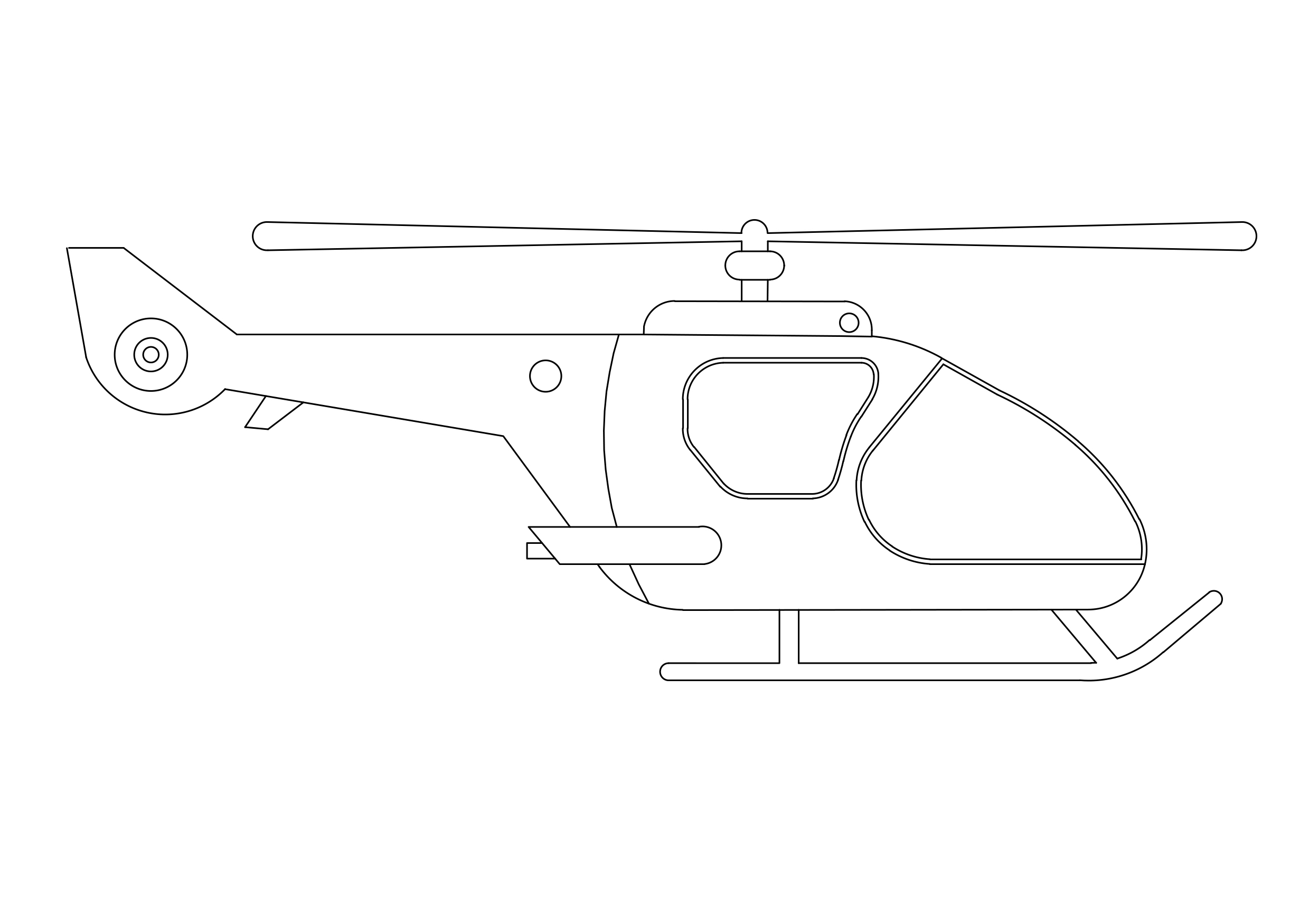
Free Helicopter Elevation CAD Block – DWG, DXF, PDF Format
A helicopter is a type of rotorcraft in which lift and thrust are supplied by rotors. This allows the helicopter to take off and land vertically, to hover, and to fly forward, backward, and laterally. These attributes allow helicopters to be used in congested or isolated areas where fixed-wing aircraft and many forms of VTOL (Vertical TakeOff and Landing) aircraft cannot perform.
The English word helicopter is adapted from the French word hélicoptère, coined by Gustave Ponton d'Amécourt in 1861, which originates from the Greek helix (ἕλιξ) "helix, spiral, whirl, convolution" and pteron (πτερόν) "wing". English language nicknames for helicopter include "chopper", "copter", "helo", "heli", and "whirlybird".
Helicopters were developed and built during the first half-century of flight, with the Focke-Wulf Fw 61 being the first operational helicopter in 1936. Some helicopters reached limited production, but it was not until 1942 that a helicopter designed by Igor Sikorsky reached full-scale production, with 131 aircraft built. Though most earlier designs used more than one main rotor, it is the single main rotor with anti-torque tail rotor configuration that has become the most common helicopter configuration. Tandem rotor helicopters are also in widespread use due to their greater payload capacity. Coaxial helicopters, tiltrotor aircraft, and compound helicopters are all flying today. Quadcopter helicopters pioneered as early as 1907 in France, and other types of multicopter have been developed for specialized applications such as unmanned drones.
You need more Transportation and Vehicle DWG and AutoCAD Blocks and Drawings? Check the Transportation Category. Access our entire CAD blocks and DWG drawings on our homepage. For free 3D files, visit Freepolygon. Need free vector illustrations? Check out Vectorfreefiles. Stay updated with the latest design news and insights at Designrecap. Explore a global directory of design professionals and firms at Meshegg. Explore more resources for architecture students and professionals at Archiskills.
REQUEST A FILE FOR FREE
SIMILAR KEYWORDS
FAQ
-
01.
HOW CAN I EARN MONEY BY UPLOADING MY CAD FILES TO FREECADS?
You can earn ad revenue from your uploaded models. Every file you upload gets its own page with ads, and you receive an 80% share of the revenue generated from that page. The more people view your work, the more you earn.
-
02.
WHEN AND HOW ARE PAYMENTS MADE TO CREATORS?
Earnings are updated daily and paid every month using the industry standard net 40 system. That means revenue generated in one month is paid 40 days later, directly to your PayPal account.
-
03.
WHAT TYPES OF FILES CAN I UPLOAD OR DOWNLOAD ON FREECADS?
Freecads supports a wide range of professional file formats including DWG, DXF, PDF, SKP, RVT, IFC, 3DM, STEP, STP, PLN, DGN, IGS, SLDPRT, FCSTD, IPT, PRT, CATPART, 3DXML, IMODEL, and more. You can upload and download 2D and 3D models across multiple design platforms.
-
04.
WHAT IS THE DIFFERENCE BETWEEN FREE AND PREMIUM MEMBERSHIPS?
Both Free and Premium members can upload and earn from their files. Free Members can upload up to 30 files per month and track their last 30 downloads, while Premium Members enjoy an ad free experience throughout the site, unlimited uploads, unlimited download history, and priority access to new features for €2.9 per month or €19.9 per year. Both tiers can still download an unlimited amount of files.
-
05.
WHAT IS NEW IN THE LATEST VERSION OF FREECADS?
The new Freecads introduces a redesigned interface, faster search, expanded file support, and a creator dashboard that lets you track views, downloads, and earnings in real time. It is now simpler, faster, and fairer for everyone.