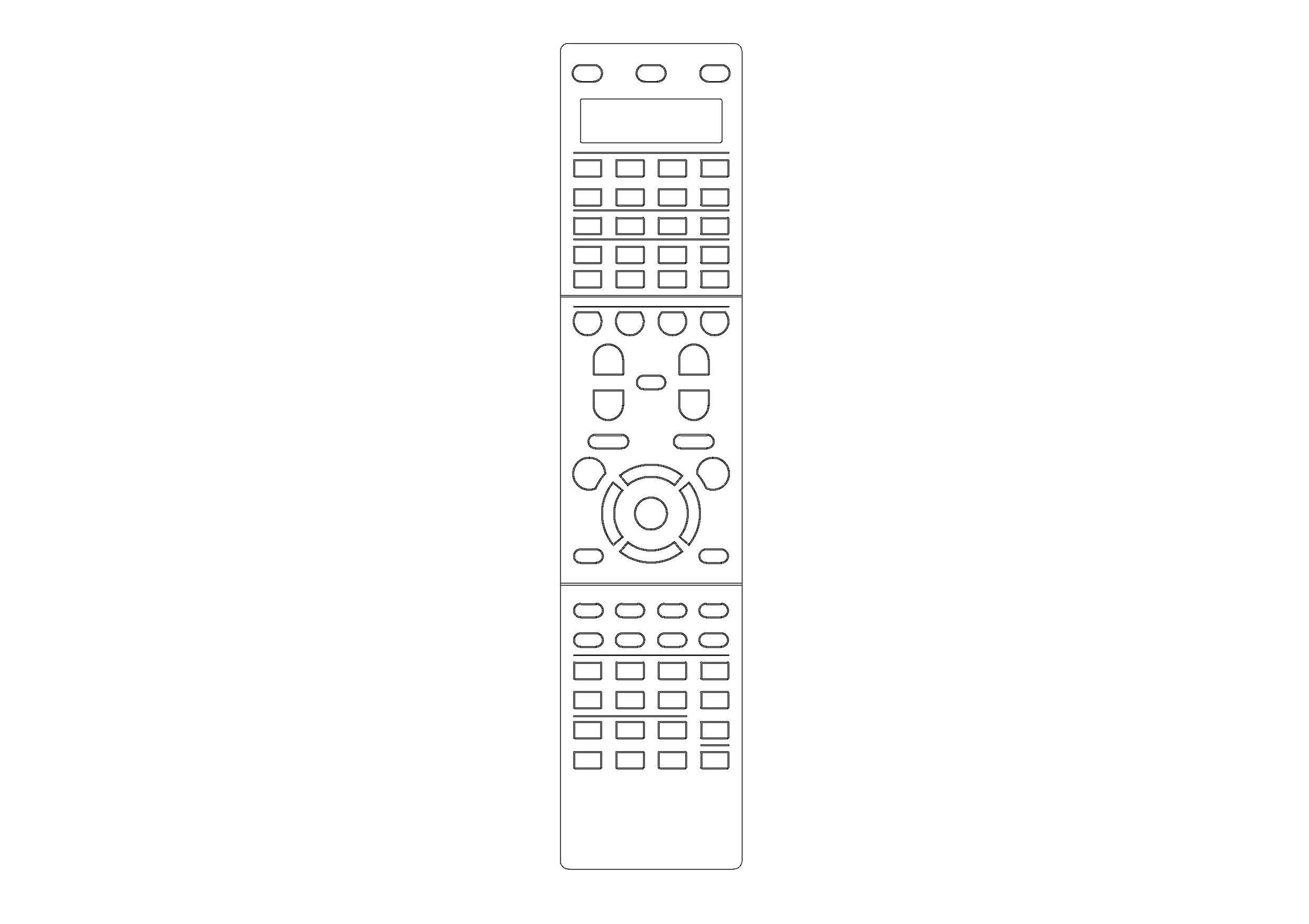
Free Remote Control Top View CAD Block – DWG, DXF, PDF Format
In electronics, a remote control or clicker is an electronic device used to operate another device from a distance, usually wirelessly. For example, in consumer electronics, a remote control can be used to operate devices such as a television set, DVD player or other home appliance, from a short distance. A remote control is primarily a convenience feature for the user, and can allow operation of devices that are out of convenient reach for direct operation of controls. In some cases, remote controls allow a person to operate a device that they otherwise would not be able to reach, as when a garage door opener is triggered from outside or when a Digital Light Processing projector that is mounted on a high ceiling is controlled by a person from the floor level.
The standard symbol used to denote that it uses infrared as a way to send the signal to devices
Early television remote controls (1956–1977) used ultrasonic tones. Present-day remote controls are commonly consumer infrared devices which send digitally-coded pulses of infrared radiation to control functions such as power, volume, channels, playback, track change, heat, fan speed, or other features varying from device to device. Remote controls for these devices are usually small wireless handheld objects with an array of buttons for adjusting various settings such as television channel, track number, and volume. For many devices, the remote control contains all the function controls while the controlled device itself has only a handful of essential primary controls. The remote control code, and thus the required remote control device, is usually specific to a product line, but there are universal remotes, which emulate the remote control made for most major brand devices.
Remote control in the 2000s includes Bluetooth connectivity, motion sensor-enabled capabilities and voice control.
You need more Technical, Electrical, HVAC, and Plumbing DWG and AutoCAD Drawings? Check the Technical Category. Access our entire CAD blocks and DWG drawings on our homepage. For free 3D files, visit Freepolygon. Need free vector illustrations? Check out Vectorfreefiles. Stay updated with the latest design news and insights at Designrecap. Explore a global directory of design professionals and firms at Meshegg. Explore more resources for architecture students and professionals at Archiskills.
REQUEST A FILE FOR FREE
SIMILAR KEYWORDS


FAQ
-
01.
HOW CAN I EARN MONEY BY UPLOADING MY CAD FILES TO FREECADS?
You can earn ad revenue from your uploaded models. Every file you upload gets its own page with ads, and you receive an 80% share of the revenue generated from that page. The more people view your work, the more you earn.
-
02.
WHEN AND HOW ARE PAYMENTS MADE TO CREATORS?
Earnings are updated daily and paid every month using the industry standard net 40 system. That means revenue generated in one month is paid 40 days later, directly to your PayPal account.
-
03.
WHAT TYPES OF FILES CAN I UPLOAD OR DOWNLOAD ON FREECADS?
Freecads supports a wide range of professional file formats including DWG, DXF, PDF, SKP, RVT, IFC, 3DM, STEP, STP, PLN, DGN, IGS, SLDPRT, FCSTD, IPT, PRT, CATPART, 3DXML, IMODEL, and more. You can upload and download 2D and 3D models across multiple design platforms.
-
04.
WHAT IS THE DIFFERENCE BETWEEN FREE AND PREMIUM MEMBERSHIPS?
Both Free and Premium members can upload and earn from their files. Free Members can upload up to 30 files per month and track their last 30 downloads, while Premium Members enjoy an ad free experience throughout the site, unlimited uploads, unlimited download history, and priority access to new features for €2.9 per month or €19.9 per year. Both tiers can still download an unlimited amount of files.
-
05.
WHAT IS NEW IN THE LATEST VERSION OF FREECADS?
The new Freecads introduces a redesigned interface, faster search, expanded file support, and a creator dashboard that lets you track views, downloads, and earnings in real time. It is now simpler, faster, and fairer for everyone.