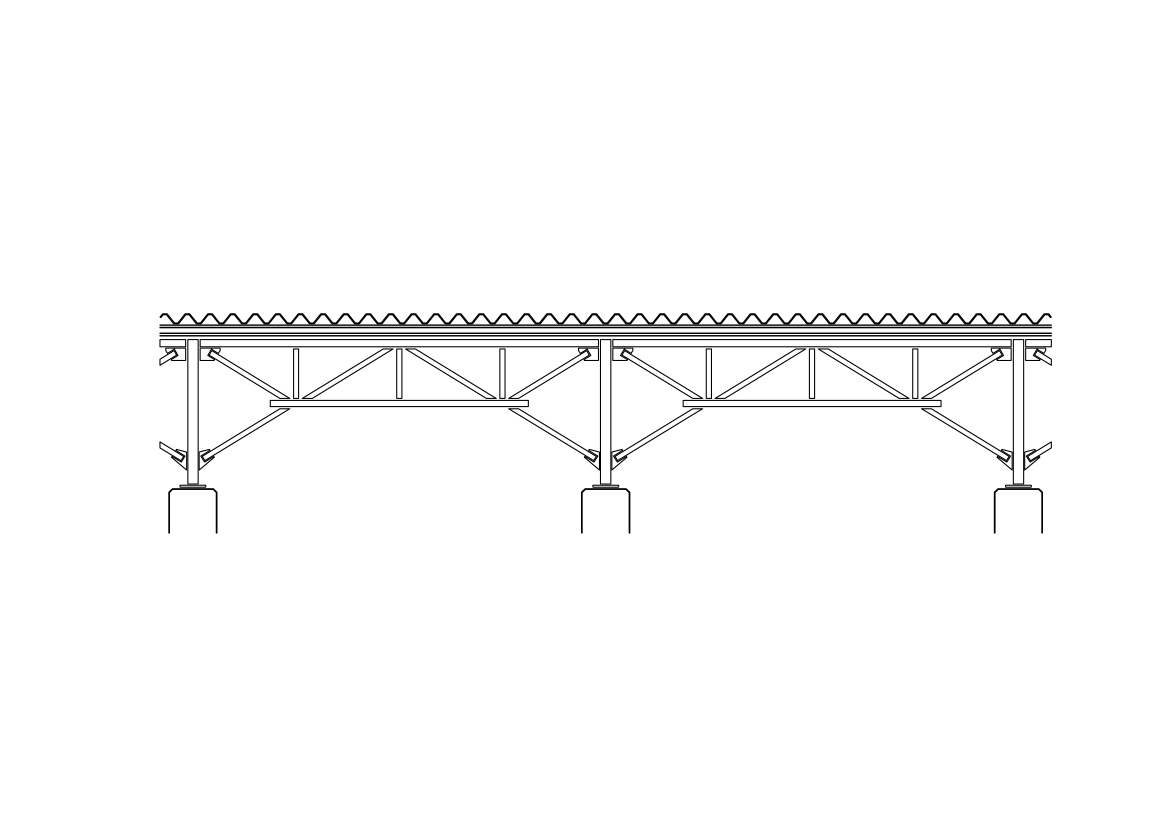
Free Truss Ceiling Section CAD Block – DWG, DXF, PDF Format
A truss is an assembly of beams or other elements that creates a rigid structure.
In engineering, a truss is a structure that "consists of two-force members only, where the members are organized so that the assemblage as a whole behaves as a single object". A "two-force member" is a structural component where force is applied to only two points. Although this rigorous definition allows the members to have any shape connected in any stable configuration, trusses typically comprise five or more triangular units constructed with straight members whose ends are connected at joints referred to as nodes.
In this typical context, external forces and reactions to those forces are considered to act only at the nodes and result in forces in the members that are either tensile or compressive. For straight members, moments (torques) are explicitly excluded because, and only because, all the joints in a truss are treated as revolutes, as is necessary for the links to be two-force members.
A planar truss is one where all members and nodes lie within a two-dimensional plane, while a space truss has members and nodes that extend into three dimensions. The top beams in a truss are called top chords and are typically in compression, the bottom beams are called bottom chords, and are typically in tension. The interior beams are called webs, and the areas inside the webs are called panels, or from graphic statics (see Cremona diagram) polygons.
You need more Architectural DWG and AutoCAD Blocks and Drawings? Check the Architecture Category. Access our entire CAD blocks and DWG drawings on our homepage. For free 3D files, visit Freepolygon. Need free vector illustrations? Check out Vectorfreefiles. Stay updated with the latest design news and insights at Designrecap. Explore a global directory of design professionals and firms at Meshegg. Explore more resources for architecture students and professionals at Archiskills.
REQUEST A FILE FOR FREE
SIMILAR KEYWORDS


FAQ
-
01.
HOW CAN I EARN MONEY BY UPLOADING MY CAD FILES TO FREECADS?
You can earn ad revenue from your uploaded models. Every file you upload gets its own page with ads, and you receive an 80% share of the revenue generated from that page. The more people view your work, the more you earn.
-
02.
WHEN AND HOW ARE PAYMENTS MADE TO CREATORS?
Earnings are updated daily and paid every month using the industry standard net 40 system. That means revenue generated in one month is paid 40 days later, directly to your PayPal account.
-
03.
WHAT TYPES OF FILES CAN I UPLOAD OR DOWNLOAD ON FREECADS?
Freecads supports a wide range of professional file formats including DWG, DXF, PDF, SKP, RVT, IFC, 3DM, STEP, STP, PLN, DGN, IGS, SLDPRT, FCSTD, IPT, PRT, CATPART, 3DXML, IMODEL, and more. You can upload and download 2D and 3D models across multiple design platforms.
-
04.
WHAT IS THE DIFFERENCE BETWEEN FREE AND PREMIUM MEMBERSHIPS?
Both Free and Premium members can upload and earn from their files. Free Members can upload up to 30 files per month and track their last 30 downloads, while Premium Members enjoy an ad free experience throughout the site, unlimited uploads, unlimited download history, and priority access to new features for €2.9 per month or €19.9 per year. Both tiers can still download an unlimited amount of files.
-
05.
WHAT IS NEW IN THE LATEST VERSION OF FREECADS?
The new Freecads introduces a redesigned interface, faster search, expanded file support, and a creator dashboard that lets you track views, downloads, and earnings in real time. It is now simpler, faster, and fairer for everyone.